Restaurant table management is the shared view of which tables are free, who looks after each one and what each occupied table needs next. In a Mauritius restaurant, the useful test is a whole service: a booking arrives, a waiter seats the guests, dishes reach the kitchen, food is collected and the bill is settled. A floor plan helps only when people keep the real room and the screen in step.
| Question | What the floor team needs to see | Who acts |
|---|---|---|
| Where can we seat? | A genuinely free table in the right area | Host or counter |
| Who owns this table? | The waiter or waiters assigned for this service | Floor lead |
| What stage is the order at? | Seated, in kitchen, ready, eating or bill asked | Assigned waiter |
| What needs attention? | A call, QR order, food ready or bill request | Assigned waiter and, where appropriate, counter |
| Can we reset the table? | Payment complete and the physical table cleared | Floor team |
Set up a table plan that matches the real room
Start with the physical room. Give each table a clear label that staff can read from the entrance and from the pass. Separate areas such as the dining room and terrace, and check that the capacity shown for each table matches the chairs you actually use. A beautiful plan with old table numbers creates more confusion than a plain, accurate one.
- Walk the room. Note the tables, entrances, narrow paths, bar and kitchen pass. Check where staff can move without crossing a guest queue.
- Draw the areas. Put each table in the correct area and use the same labels on the plan and in the room.
- Test from two positions. Ask the host and a waiter to find the same table without pointing at a screen together.
- Review after changes. If you move or combine furniture for a function, tell the team which plan and physical labels now apply.
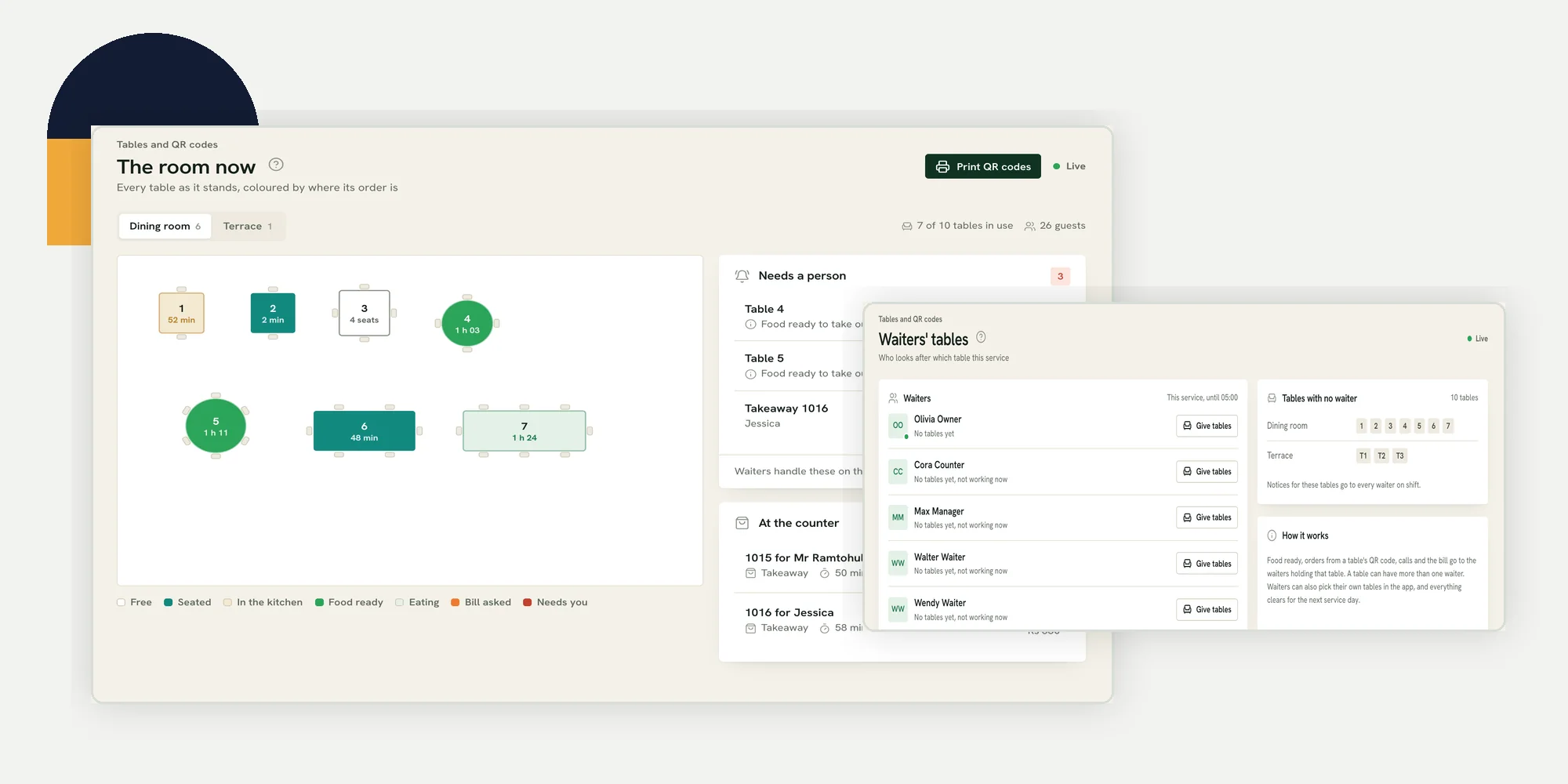
The Ferculon floor plan can be drawn area by area, with square, round, long and bar stool tables, plus room elements. Its demo screen below shows a dining room and terrace. That is a planning aid, not a substitute for checking the physical layout before opening.
Give each table a clear owner for this service
A floor plan answers where a table is. It does not answer who responds when guests call. Before the first booking, split responsibility by area and by table. Check hand-overs when a waiter goes on break, a large party needs help, or the terrace suddenly gets busy. The person taking over should know both the table number and the open order.
- Assign before opening. Name the waiter or team responsible for each occupied section.
- Leave no silent gaps. If a table has no assigned waiter, decide who watches its calls and ready dishes.
- Allow help without losing ownership. More than one waiter may support a table, but agree who speaks to the guest and who handles payment.
- Recheck after a change. A staff swap should be visible to the counter and to the people on the floor.
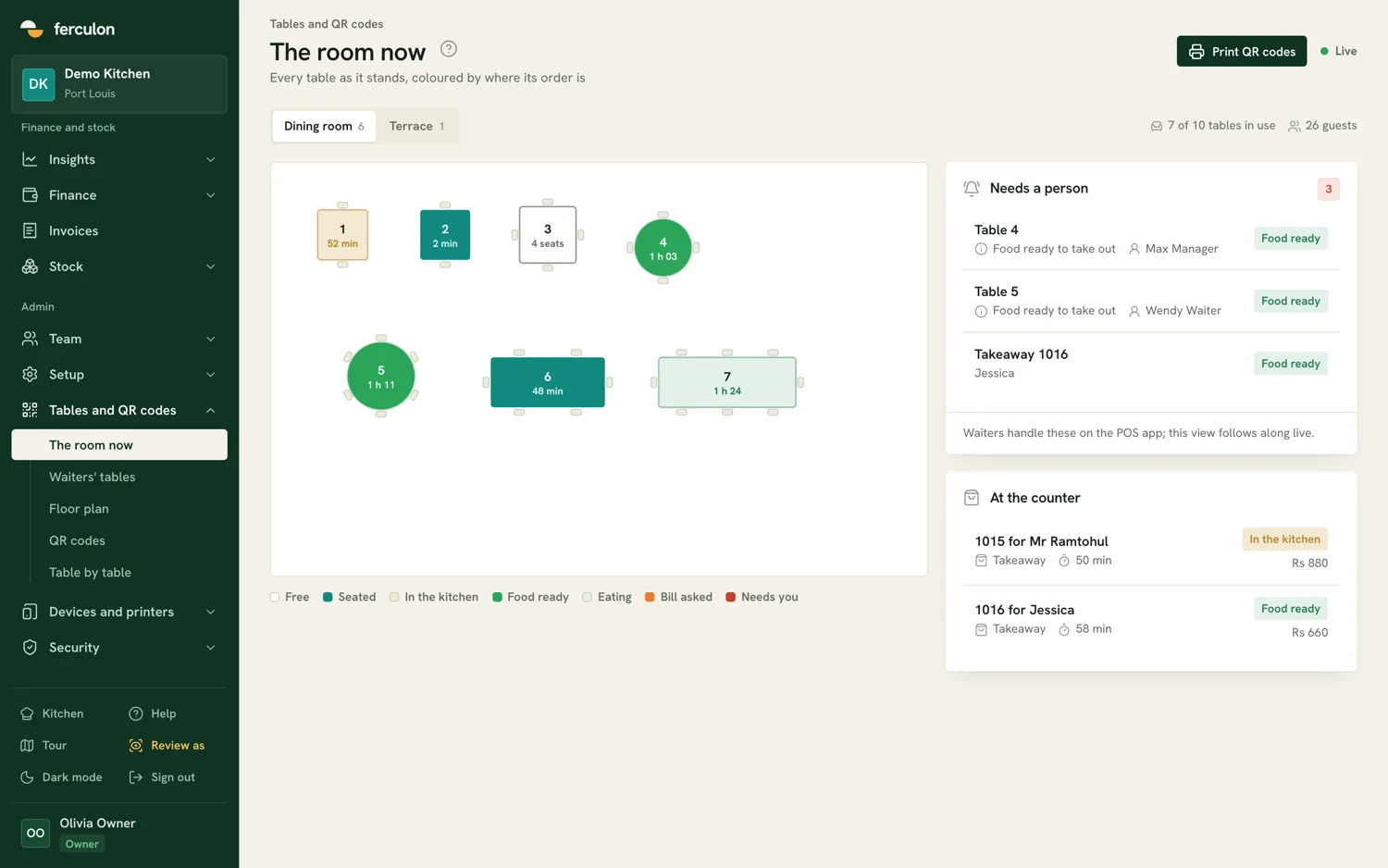
In Ferculon, a manager or the counter can assign tables to waiters for a service. The waiter app shows the waiter their tables, while QR orders, food-ready notices, calls and bill requests go to the people holding the table. The screen also shows tables without a waiter. This makes ownership visible; it cannot decide how many tables one person can handle well.
Read the live table status without guessing
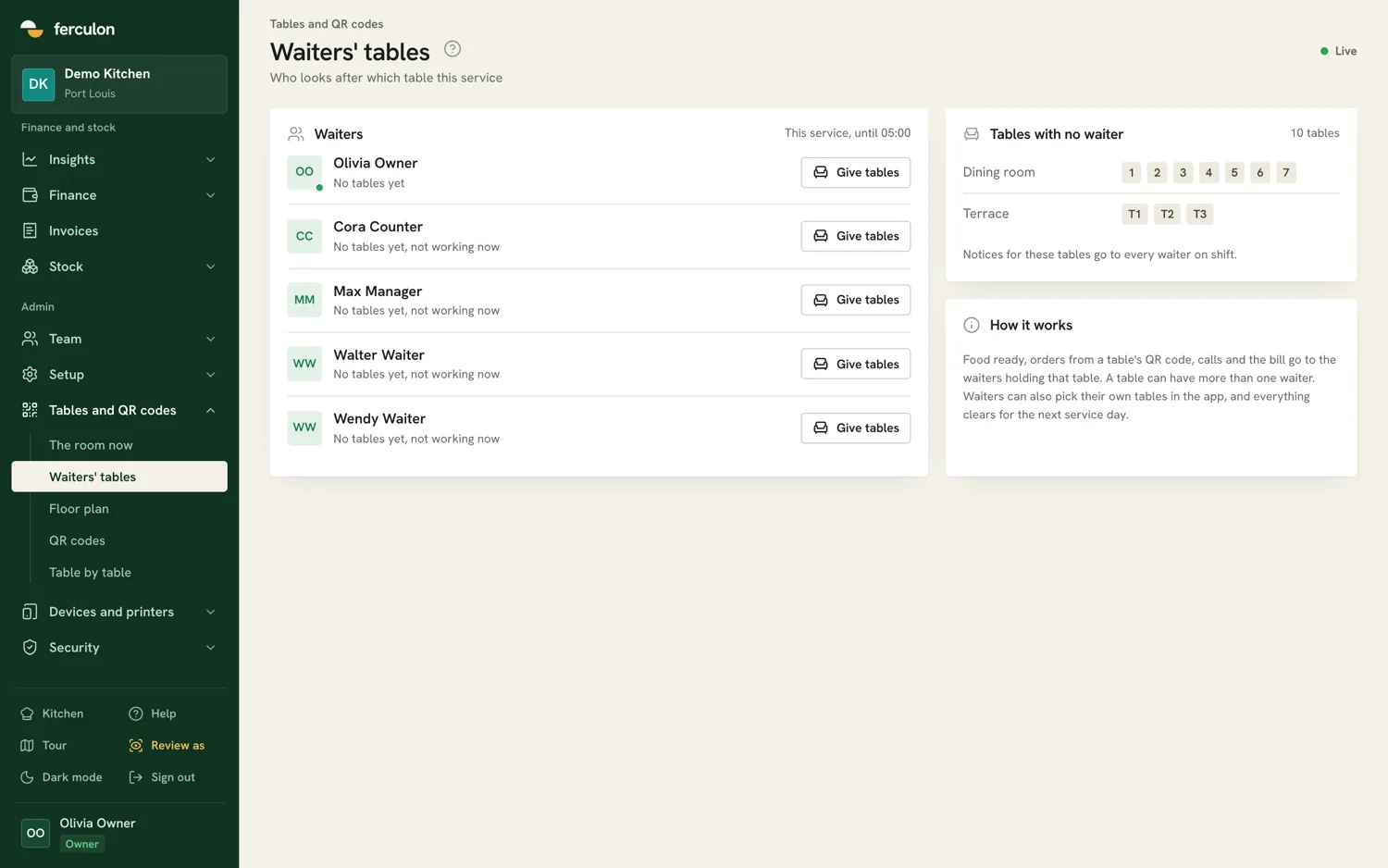
A coloured table is a prompt for action, not a complete account of the guest experience. Agree on what each state means in your restaurant. Seated can mean an order is still to be taken. In the kitchen means the ticket has been sent, not that the food is nearly ready. Food ready means someone should collect it. Bill asked means a guest wants the next step, not that payment has been taken.
| State | Useful next check |
|---|---|
| Free | Is the physical table cleared and available? |
| Seated | Has someone greeted the table and taken the order? |
| In the kitchen | Is the ticket at the right station and course? |
| Food ready | Who will collect it from the pass? |
| Eating | Does the table need another round or assistance? |
| Bill asked | Has the waiter brought the bill and settled payment? |
Ferculon shows these stages to waiters, counter staff and managers on the same live floor. The kitchen display shows course tickets and marks food ready, which sends a notice to the relevant waiter. Staff should still confirm the dish and the table at the pass. The screen cannot see a guest waving, a spill, or a chair blocking a route.
Connect bookings to the tables you can actually seat
A booking is a promise of a place, not proof that a particular table is free. Review the book before each service, then compare party sizes with the tables available in each area. Keep room for the walk-ins your restaurant expects, and make a plan for late arrivals and cancellations. Avoid promising the same table to two parties whose visits might overlap.
The reservation guide follows the guest and counter journey in detail. In Ferculon, a guest can request a table from the restaurant page, or staff can enter a phone booking. Staff can assign a table and mark the party seated, which opens the table order. That link is useful, but the host still needs to check whether the party has arrived and whether the table is ready.
- Before opening: Compare confirmed bookings with table capacity and any area that is unavailable.
- When guests arrive: Confirm the name and party size before seating and marking the booking seated.
- When plans change: Update the book and tell the assigned waiter rather than relying on a note that nobody sees.
- Before the next seating: Verify the bill is closed and the table is physically ready.
Test the hand-offs before a busy shift
A short rehearsal reveals more than looking at a feature list. Use a demo table and move it through the same steps your staff will take tonight. Have the host, waiter, kitchen and counter each do their own part. Record any point where two people assume the other will act.
- Seat and assign. Confirm that the right area, table and waiter appear on the floor.
- Take the order. Add a dish and option, then send the correct course to the kitchen.
- Mark it ready. Check that the notice reaches the responsible waiter, who collects the right food.
- Ask for help and the bill. Test the guest call and bill request route, including the counter view.
- Settle and clear. Check the final bill, then verify the real table before treating it as available again.
For a wider opening rehearsal, use the POS setup guide. It covers menu, staff access and a controlled order. If dishes are unavailable before service, the inventory management guide shows how to count stock and record changes. Neither a good floor map nor a booking list fixes missing ingredients or a wrong menu.
Know what table management software cannot do
No screen can tell whether a guest needs more time, whether the music is too loud, or whether two small tables can be moved safely. It also cannot guarantee that a table marked free is clean. Give staff permission to correct the plan and to slow seating when the kitchen or floor is overloaded. When the connection is unreliable, agree on a paper or verbal fallback before service, then reconcile it carefully when the system returns. Test the exact behaviour of your chosen setup rather than assuming every screen works offline.
If you want to compare that sequence with your own floor, ask for a walkthrough. The pricing page is the place to enquire about a setup for your restaurant.
Questions people ask
What is restaurant table management?
It is a shared way to see which tables are available, who is responsible for them and what each occupied table needs next. The plan must match the physical room and the team must keep it current.
Do I need separate plans for the dining room and terrace?
Separate areas make it easier to read the room and assign responsibility. Ferculon supports an area-by-area floor plan, including a dining room and terrace in its demo.
Can two waiters look after one table?
Yes. Ferculon can show more than one waiter holding a table. The team should still agree who speaks to guests and who handles payment.
Does marking food ready mean it has reached the guest?
No. It means the kitchen has marked the course ready and the responsible waiter is notified. Someone still has to check the dish and take it to the right table.
Does a table marked free mean it is ready for new guests?
Not by itself. Staff should confirm the bill is closed and the physical table is cleared before seating anyone.