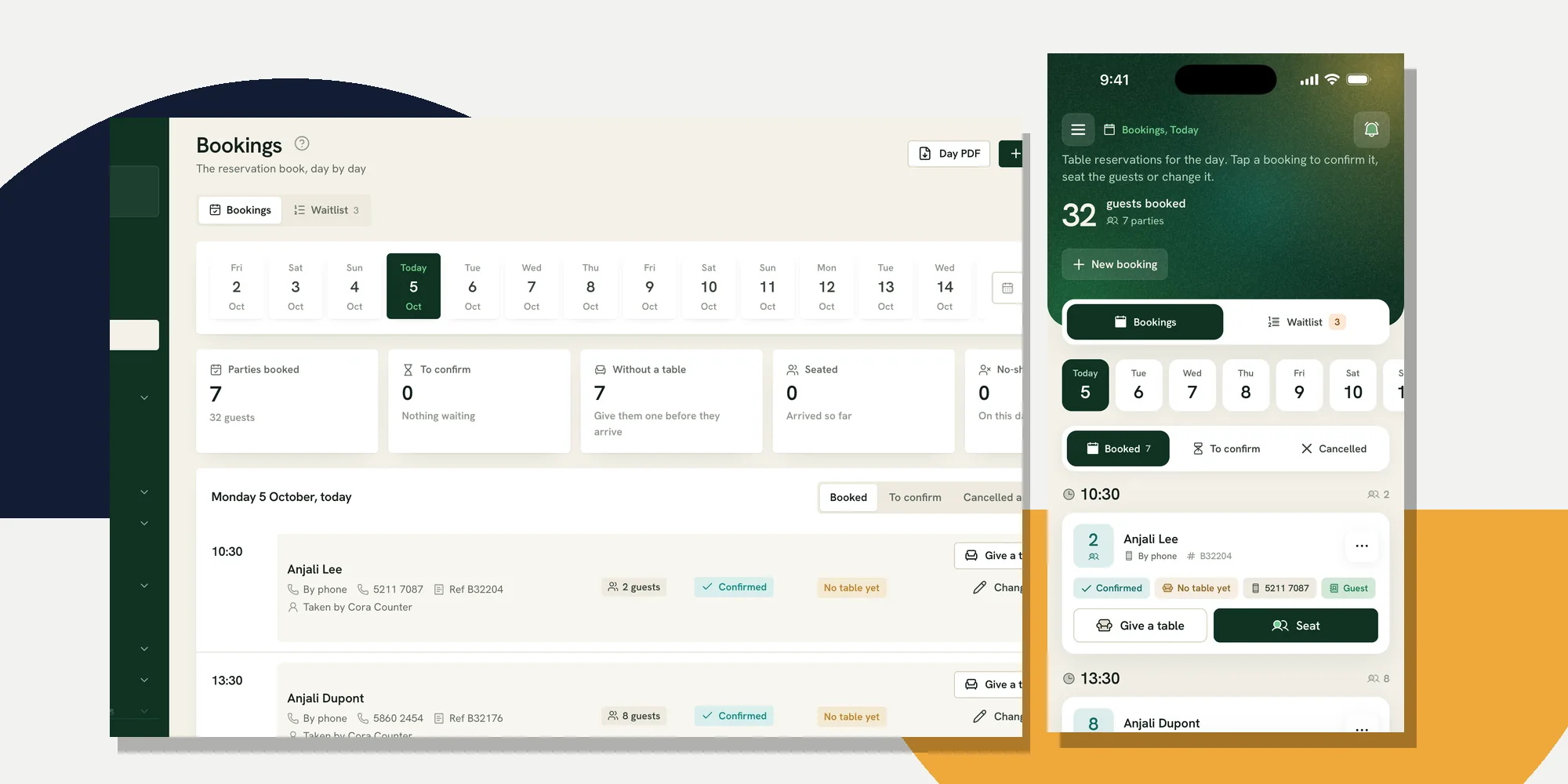
A restaurant reservation system is the booking book that guests and staff use together. It should offer times the room can actually take, keep online requests beside bookings taken by phone, confirm what was agreed, and help the floor seat the party without re-entering it. If it stops at an online form, someone still has to run a second book during service.
For a restaurant in Mauritius, test the full journey with the people who will use it tonight. Ferculon’s online bookings provide one example: guests request a table from the restaurant’s own page, prove their number with a code sent by WhatsApp or, if that fails, by email, and the booking enters the same book the counter uses. The important question is what happens after the request arrives.
What a restaurant reservation system must record
A booking is more than a name and a time. The team needs the party size, how to reach the guest, where the request came from, whether it is confirmed, whether it has a table, and what changed since it was made. Keep a guest note with the booking, but do not treat a note as an instruction the kitchen has already accepted.
| Moment | The record should show | The person who acts |
|---|---|---|
| A time is offered | Opening window, party size and whether the room can take that party | Guest or counter staff chooses an available time |
| The booking arrives | Name, contact, source, time, party and guest note | Counter sees whether it needs confirmation |
| The plan changes | New time or party, previous status and the person who changed it | Floor checks the room and tells the guest what is confirmed |
| The party arrives | Table assigned, party seated and any note that matters to service | Waiter opens the table and takes the order |
| The party does not arrive | No-show or cancellation recorded against the booking | Manager decides when to release the table |
Read the table horizontally during a demonstration. A reservation system can have an attractive calendar and still fail when the counter cannot see a change made online. Ask whether every source creates the same kind of booking record, and whether the team can tell a pending request from a confirmed one without opening each card.
Set availability from the room you can serve
Start with opening hours, including days that close early or do not open at all. Then decide how far ahead guests may book, how much notice the kitchen and floor need, how large a party may book online, and how many arrivals the team can seat in the same booking window. A slot should disappear when the room has no seats for that party, not only when the clock has reached its limit.
Ferculon’s booking settings allow the restaurant to set the booking horizon and turn off online bookings on chosen dates while staff can still take a booking. The underlying reservation code checks opening windows, notices, arrivals and seats before offering a guest a time. Staff booking by phone can see the room and make a deliberate exception where the online rule would refuse one. That is useful for a party the manager knows can fit, but the exception still needs a person responsible for it.
Draw the actual room in the floor plan before trusting a capacity figure. Tables that are out of service, pushed together, or reserved for an event change what the room can take. A system can use configured seats to prevent an obvious overlap; it cannot know that the terrace is unusable after a downpour unless staff update the plan or stop offering those tables.
Bring online and phone bookings into one book
A guest may find the restaurant’s page, while another calls after speaking to the hotel desk. Neither booking should live in a separate notebook. Give counter staff a quick way to enter a phone booking with the same party, time, contact and note fields as an online one. Make the source visible so staff know whether the guest has already verified their contact or gave it over the phone.
In Ferculon, guests can book from the restaurant’s own page. The online path checks a code sent to the guest’s WhatsApp number, with an email code available if that message does not arrive. Counter staff can enter phone bookings directly. Both appear in the bookings view, where the day can be filtered to requests awaiting confirmation, active bookings, cancellations and no-shows. The guest page and the counter should be tested together, not in separate demos.
Write down what guests see when no time fits. A full service should not invite a request the team will later have to refuse by phone. If the restaurant also takes online orders from its own page, keep that channel distinct from table bookings: a pick-up order is not a request to seat a party. The online ordering guide covers that separate counter and delivery workflow.
Confirm, change and cancel clearly
Decide whether an available online request is confirmed at once or waits for a person at the counter. Both can work. Automatic confirmation removes a manual step when capacity settings are trustworthy. Manual confirmation gives the team a chance to check special requests, but somebody must watch the pending list. A guest should never have to guess whether a request is a reservation.
Ferculon can be set to confirm online bookings automatically or leave them pending for staff. Its guest flow verifies the contact first; confirmed bookings can receive a message, and the restaurant’s booking email settings cover confirmation, reminders, changes and cancellations. Test an undelivered contact code and a changed party size during the demonstration. Check the booking card after each action, then ask which message actually went out rather than assuming a notification was delivered.
A cancellation should release the plan clearly, and a no-show should be recorded without pretending the guest was seated. The back office separates those outcomes from active bookings. A manager still decides when to mark a party late or release its table; a timer cannot judge traffic, a delayed ferry or a guest who called ahead. Keep that decision in the shift routine.
Give the party a table and open service
The booking is operational only when it reaches the floor. Staff should see which party is expected, which table has been assigned and whether that table is already in use. The reservation code behind Ferculon checks a proposed table against other active bookings at overlapping times and its seats. On arrival, staff can mark the booking seated; that opens the table’s order with the party attached. A note from the booking can travel with the order for staff to read.
That hand-off matters because a booking list and a waiter app can otherwise disagree about the room. Open the live floor view while the counter seats a demo party. Ask the waiter to find the table, see the party size, take an order and send it to the kitchen. The restaurant management system guide shows how this connects to the wider floor, kitchen and back office, but the reservation test should stand on its own.
Do not ask the booking system to solve every service decision. It can warn about a table conflict or a party that is larger than the table’s configured seats. It cannot decide whether a family will accept a quieter room, whether a table needs more time to finish, or whether a guest note about an allergy is safe to serve. Those remain staff decisions.
Test the system with the people who run service
Bring the counter lead and a waiter to the demonstration. Use a room plan that resembles yours and take a booking from the public page while the counter watches. Then add another by phone for a similar time, change its party size, assign tables, cancel a booking, mark a no-show and seat the remaining party. Ask each person what their screen shows before the supplier explains it.
- Offer a time: Close a date or fill the room, then confirm that the guest page stops offering the unavailable slot while staff can see why.
- Take both routes: Complete a public booking and a phone booking. Check the same day view, the source and the confirmation state.
- Change the plan: Move a time or increase a party. Check the available seats, table assignment and the message trail.
- Start service: Give the party a table, mark it seated and ask the waiter to open the table order.
- Handle failure: Try a contact code that does not arrive, then follow the email fallback. Ask what the counter does if the network or power fails.
Record which actions needed a workaround. If the supplier cannot demonstrate a complete journey, the restaurant will discover the missing step during a busy service. Ask for a demonstration on Ferculon using your own room and booking rules, and use the same sequence to compare any other system. The pricing page explains how to request a quote for your restaurant.
What the system cannot do for you
No reservation system can make a guest arrive, judge how long a table will actually stay, or decide when to turn away a walk-in. Even a careful availability rule depends on the floor plan, opening hours and special dates being maintained. Review those settings when the room or service changes. Give one person on each shift responsibility for pending requests and the day’s table plan.
If the online page, counter book and live floor agree through the whole test, the system can save staff from carrying the same booking between tools. If they disagree, fix the hand-off before asking guests to rely on it. That is the decision a demonstration should settle.
Questions people ask
What should a restaurant reservation system do?
It should offer times the restaurant can serve, record online and phone bookings in one place, show whether each request is confirmed, and carry the party to a table. Test changes, cancellations and no-shows as well as the first booking.
Can guests book directly from a restaurant’s own website?
Yes, when the restaurant uses a system with a public booking page. Ferculon lets guests request a table from the restaurant’s own page and verifies the contact with a WhatsApp code, or an email code if that fails. The booking appears in the counter’s book.
Should online bookings confirm automatically?
That depends on how reliably the availability settings describe the room. Ferculon can confirm an available request automatically or leave it pending for staff. If staff confirmation is chosen, somebody must watch the pending list and tell the guest the outcome.
What happens when a booked party arrives?
Staff assign an appropriate table and mark the party seated. In Ferculon, seating a booking opens the table order with the party attached. The waiter can then take the order on the live floor.
Can software prevent restaurant no-shows?
It can record a no-show and help staff send confirmations and reminders, but it cannot make a guest arrive. The restaurant still decides when a late party is treated as a no-show and when its table may be given away.