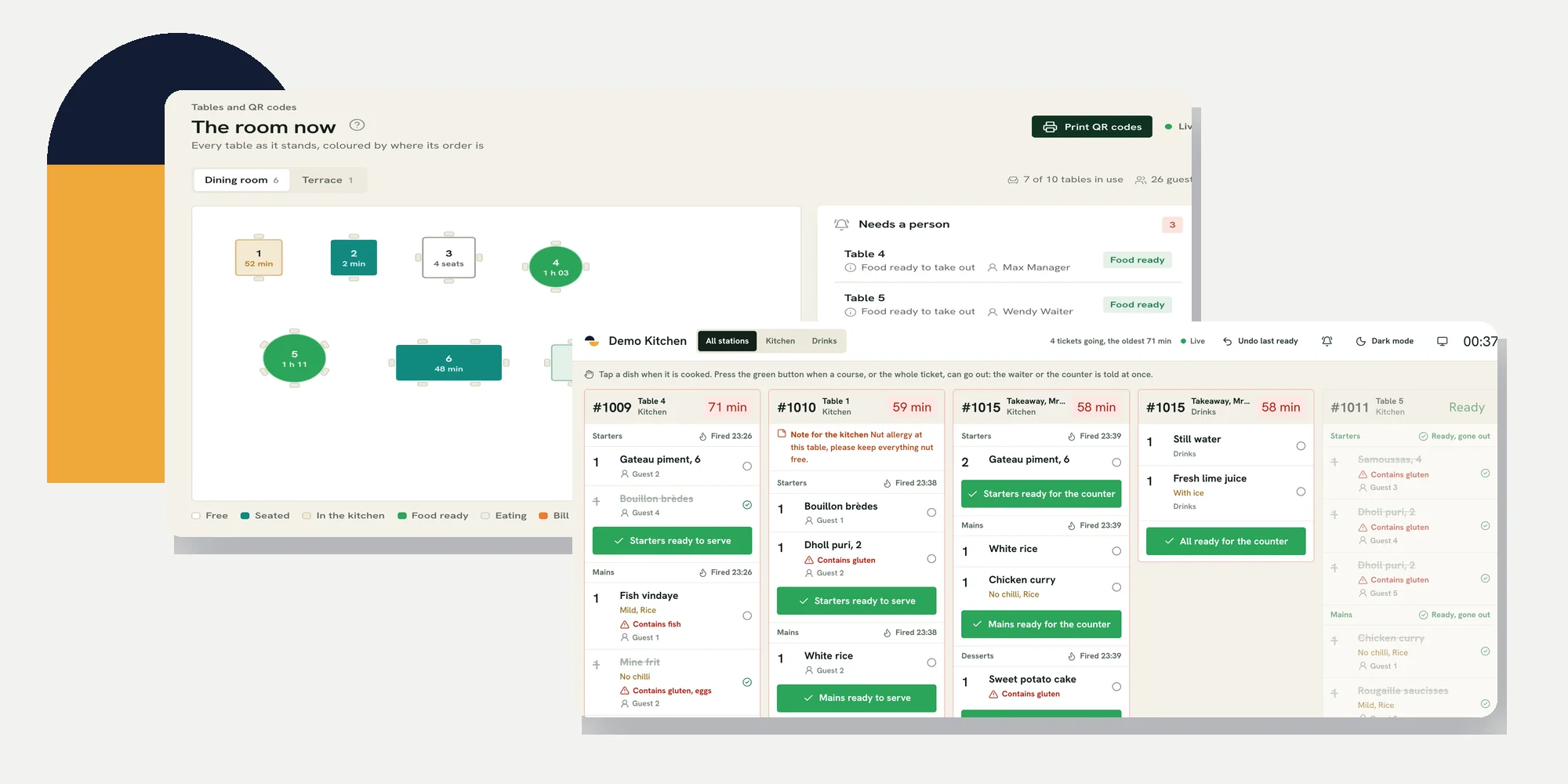
Restaurant POS software should keep one order intact as it moves from the waiter to the kitchen, through a split bill and into the owner’s closing records. For a restaurant in Mauritius, the best test is a short service with your own menu and staff roles. The screen may look quick when one person demonstrates it alone; the real question is whether the next person sees the right information at the right time.
This is a service test, not a list of vendors. Bring a waiter, someone from the kitchen and the person who closes the till. The setup guide covers configuration before opening, while the Mauritius buying guide covers supplier questions. Here you will follow one order across the whole restaurant and check the record left behind.
| Moment | Person who acts | What the next person should see |
|---|---|---|
| Seat and order | Waiter | Correct table, dishes, options and course |
| Prepare | Kitchen | Ticket at the right station, with changes visible |
| Serve | Waiter | Ready notice for the right table and course |
| Settle | Waiter or counter | Open balance, split and each payment method |
| Close | Manager | Paid order, payment history and till difference |
What restaurant POS software must keep connected
A useful system has one order identity from the first dish to the final receipt. Staff need to know which table or collection order they are handling, what changed, what has reached the kitchen and what is still unpaid. If a counter order, a table QR order and an online order each arrive in a separate queue, ask who reconciles them during a rush. The hand-off is part of the product, not an administrative detail.
- One current order: Everyone working on it sees the latest dishes, options and course status.
- Clear responsibility: A waiter or counter person knows when a guest, kitchen or payment needs attention.
- Traceable changes: A correction, discount, void or refund has an owner and a record after the bill closes.
- Useful closing view: Paid orders and payment methods can be checked against the physical till and provider records.
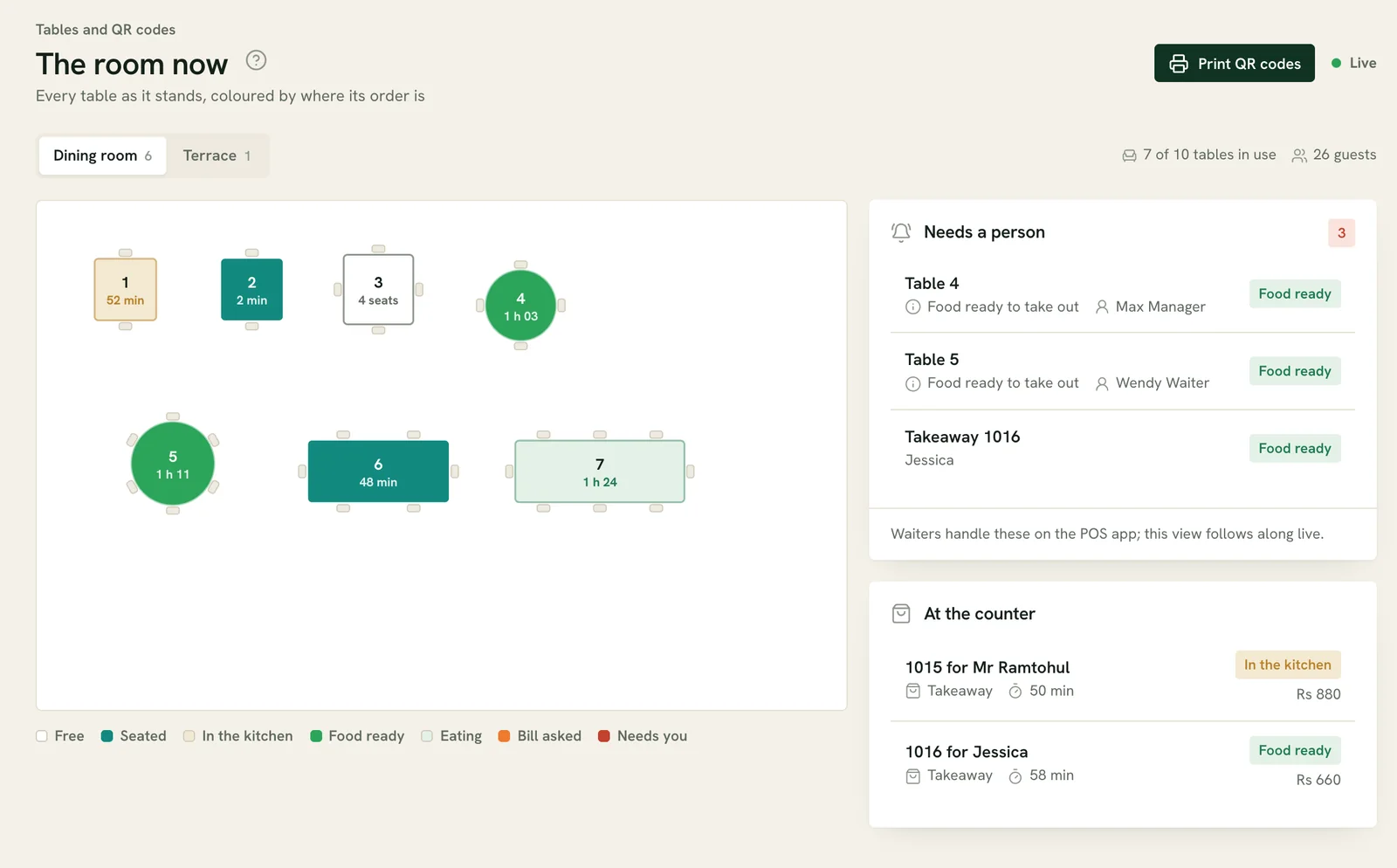
In the Ferculon floor workflow, waiters take orders at tables and managers can assign tables for a service. The shared floor shows each table’s order state. The demo image below is a sample restaurant, not a customer result. Use it to ask whether your own room labels and responsibilities would be clear to someone joining a busy shift.
Send an order to the kitchen without losing its details
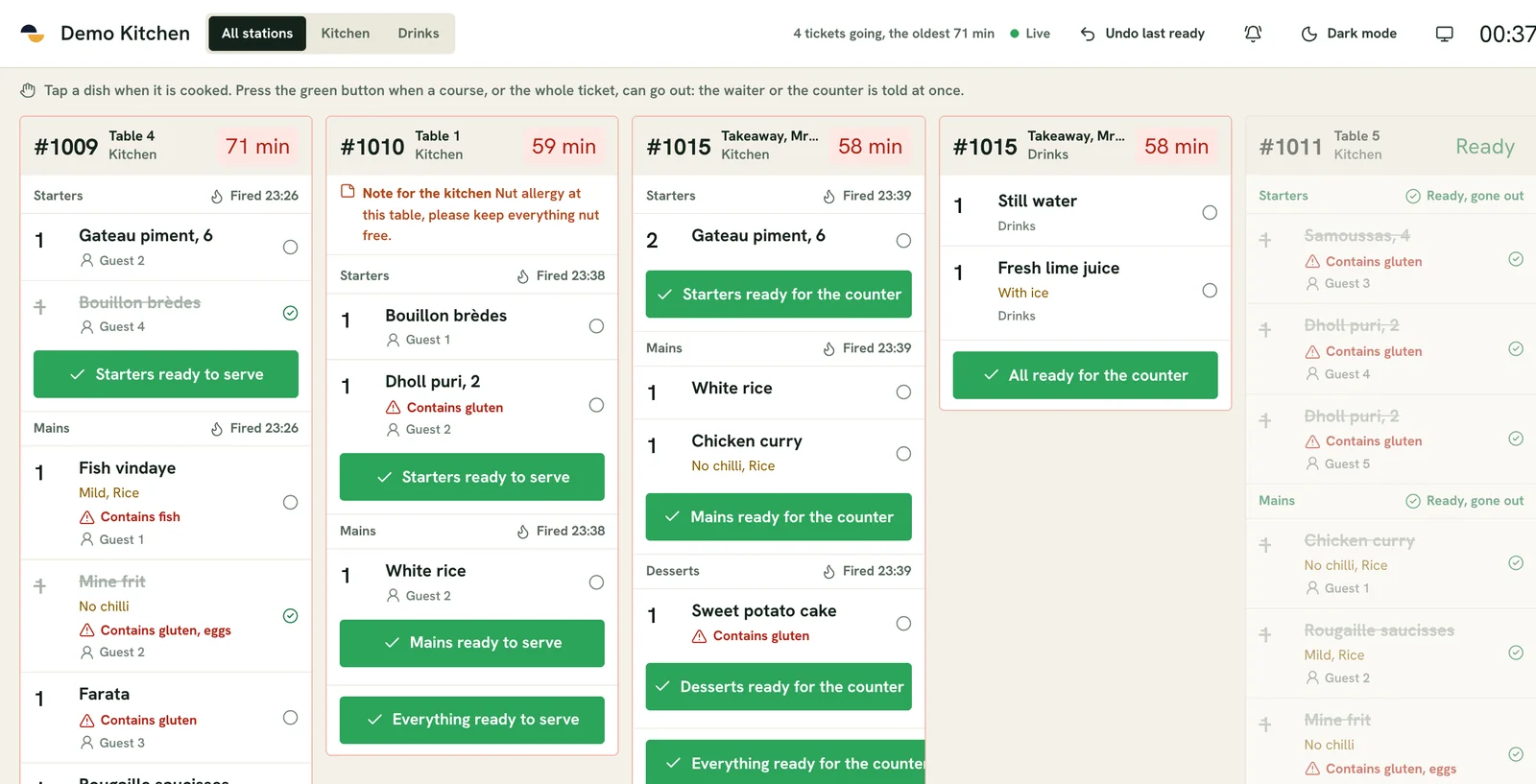
Start with one table. Add a starter and a main with an option, send the starter and hold the main if that is how your service works. Ask the kitchen to read the ticket without prompting. It should show the right table, course, station, quantity and note. Then change one item and ask where the update appears. A screen that shows the first order but hides later changes creates a verbal workaround exactly when the kitchen is busiest.
The Ferculon kitchen display groups tickets by course and station. A kitchen worker marks a course ready, and the relevant waiter or counter receives a notice. That means the team can follow the hand-off on the screen. It does not check food quality or verify that the right plate reached the right guest. Keep the usual pass checks and allergen procedure in place.
Test a takeaway beside the dine-in order. Does it reach the right counter and kitchen view without being mistaken for a table? If the restaurant accepts orders through its own page or table codes, include one of those too. Ask when the order becomes visible to cooks and who must accept it first. The answer may differ by channel and setting, so observe the actual workflow rather than guessing from a feature label.
Settle the bill and keep every payment visible
Before collecting money, compare the table bill with the dishes served. Add a later round, then have guests ask to divide the bill in two different ways. A split should leave a clear remaining balance after each payment, including a shared item or a tip. The billing guide tests equal, seat, dish and amount splits in more detail. Here the point is to make sure that splitting does not detach payments from the original order.
Ferculon supports splits equally, by seat, by dish or by amount. Its payment record separates tips from takings and can record configured methods such as cash, card and wallet transfer with a reference. Ask the staff member to find the same payment in the paid order and in Finance, then compare a real wallet or card provider record with it. A guest screenshot alone does not prove a transfer settled.
| Guest action | On-screen check | Closing check |
|---|---|---|
| Pays one share | Balance reduces once, by the right amount | Payment has a method and person |
| Adds a tip | Tip is separate from the food sale | Tip is separate in Finance |
| Pays by wallet | Reference is recorded on the order | Provider record matches the reference |
| Settles the rest in cash | Order closes with no open balance | Cash is included in expected till |
Do not treat an operational bill as an MRA fiscal invoice. The Mauritius Revenue Authority e-Invoicing guidance explains the separate fiscalisation process. Ferculon does not transmit fiscal invoices to the MRA Electronic Billing System. This guide is not tax or legal advice; ask a qualified adviser which obligations apply to your restaurant.
Read the closing record before trusting a dashboard
A manager needs to know what was paid, what was refunded, what remains open and whether the cash drawer balances. Ask to search for the test order by its number after payment. Check its dishes, payment methods, people involved and any corrections. Then open Finance for the same period. A total on its own is less useful than a path back to the orders that produced it.
The Ferculon back office shows paid orders, payments, tips, refunds, daily totals and till counts. It can export reports. Those records are useful for an owner, but they still need comparison with the cash in the drawer and the card or wallet provider. A report cannot tell whether a cash note was handed to the right person unless staff record the physical hand-off.
Stock is a separate but connected check. If you need recipes, ingredient counts, deliveries and waste in the same evaluation, use the inventory management guide and start with a physical shelf count. A POS sale can deduct stock only as accurately as the recipes and movements entered. Do not judge a system by a tidy stock number before checking those inputs with the kitchen.
Test a connection problem on the devices you will use
Ask the supplier to show what the waiter phone, kitchen screen, counter and office browser each do when the connection is interrupted. Do not accept “works offline” as a single answer. The useful questions are which actions can continue, which are saved for later, who sees that work has not synced, and how staff prevent duplicate orders or payments when service returns. Test the printer separately if your kitchen depends on one.
- Take an order: Can the device still display the menu and record the action, or must staff use a paper fallback?
- Tell the kitchen: How does the cook know a new ticket exists if the waiter device cannot reach it?
- Take payment: Which methods need a live provider connection, and what should staff do while that provider is unavailable?
- Reconcile later: How are saved actions shown after reconnection, and who checks that no order was entered twice?
Ferculon’s app has offline handling for parts of service, but behaviour differs by action and device. Run the exact test on your planned phones, tablets, printers and network before opening. Agree on a verbal or paper backup with the team. That backup needs an owner who reconciles it when the system is available again.
Run one service test before you choose restaurant POS software
- Prepare the room and roles. Use your table names, menu options and staff permissions, then assign a waiter.
- Open a table order. Send a starter, hold a main and add a later round.
- Follow the kitchen hand-off. Have cooks mark a course ready and ask who receives the notice.
- Split and pay. Use two payment methods, a tip and a correction, then check the open balance.
- Close the shift. Find the paid order, compare provider references and count the till.
- Repeat one step with the connection interrupted. Record what each device actually allows and how the team reconciles it.
Give every supplier the same test so the comparison is fair. Ask who trains the floor and kitchen teams, how your existing printers fit, how to export your records and who answers during your trading hours. Read the commercial terms on pricing rather than assuming a published plan covers your restaurant. If you want to run this sequence in Ferculon, request a walkthrough with a sample of your own menu.
Questions people ask
What should restaurant POS software include?
It should keep orders, kitchen hand-offs, bills and payments connected to one clear record. Test the exact flow your staff use, including a later change, a split bill and closing checks. Extra features are useful only when the core service is reliable.
Can restaurant POS software work without internet?
The answer depends on the product, device and action. Test ordering, kitchen communication, printing and payment separately during a controlled outage. Agree on a fallback and a way to reconcile saved work when service returns.
How do I compare restaurant POS suppliers fairly?
Give each supplier the same table, menu, staff roles and payment scenario. Have your own waiter, cook and manager perform the steps. Compare what each person sees, how exceptions are recorded and what remains visible at closing time.
Does Ferculon support split bills?
Yes. Ferculon supports equal, seat, dish and amount splits, with tips kept apart from takings. Test a shared item and two payment methods in a demonstration to see how the remaining balance is handled.
Does a Ferculon receipt count as an MRA fiscal invoice?
Ferculon does not transmit fiscal invoices to the MRA Electronic Billing System. Its operational bills and receipts should not be described as MRA-fiscalised documents. Check the MRA guidance and your own obligations with a qualified adviser.