Restaurant billing software should carry a bill from the first order to the final payment without losing the table, the payment method or the record you need at closing time. For a restaurant in Mauritius, test that journey with your own service rules. A feature list cannot show whether a waiter can split a table correctly while the counter can still reconcile cash, card and wallets.
| Moment | What to try | Record to check |
|---|---|---|
| Order | Add dishes, options and a later round to one table | One clear open bill with the right items |
| Split | Try equal, by seat, by dish and a chosen amount | No missing or duplicated balance |
| Payment | Use cash, card and the wallets you actually accept | Method and reference beside each payment |
| Close | Count the drawer and review the paid order | Expected cash, counted cash and any difference |
What restaurant billing software must cover
Billing is more than printing a total. Staff need to see which order is open, what has already been paid and which part is still due. A manager needs the paid order and its payment history later. Ask the supplier to demonstrate all three views using the same test table, rather than three unrelated sample screens.
- At the table: The waiter can check dishes, options, discounts and the amount due before collecting money.
- At payment: The bill can be divided in the ways your guests ask for, and each payment keeps its method and reference.
- After payment: The order moves to paid history, while finance can show takings, payment methods, tips and till counts for the chosen period.
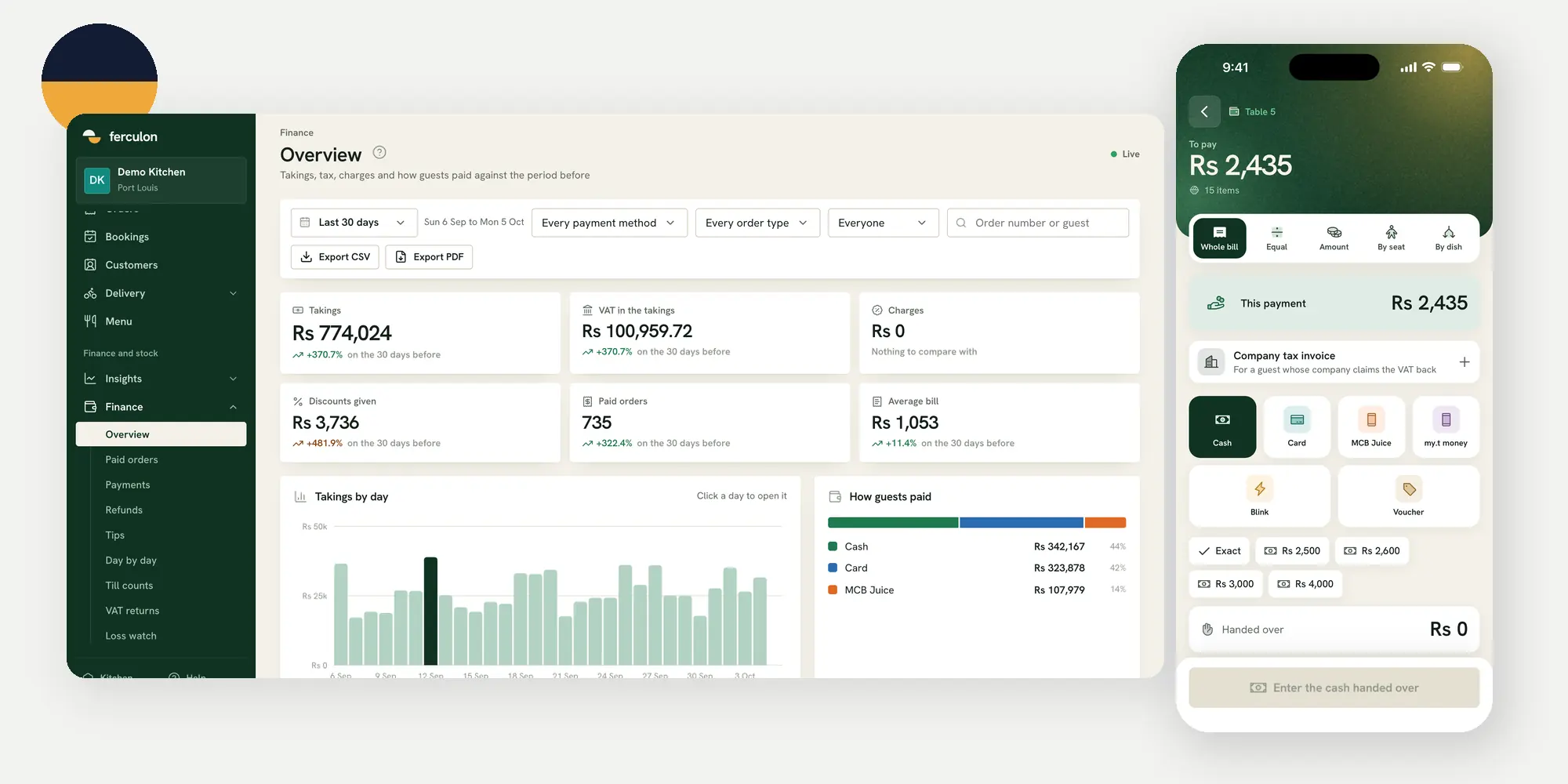
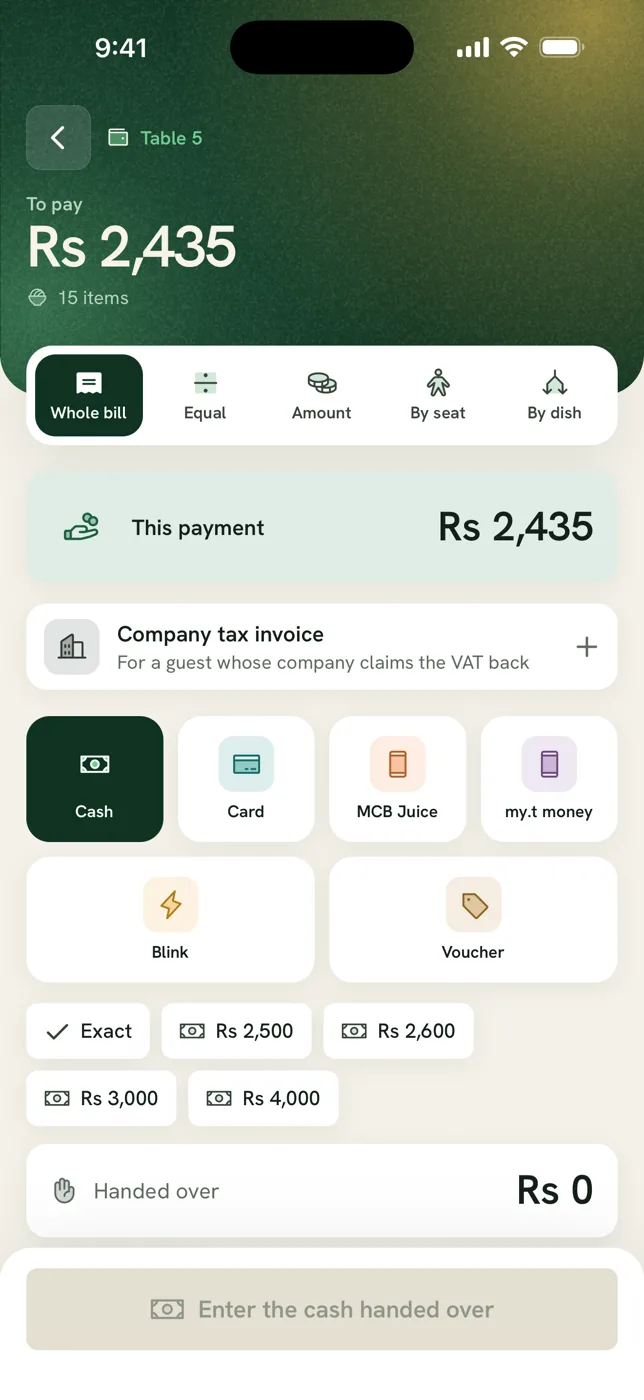
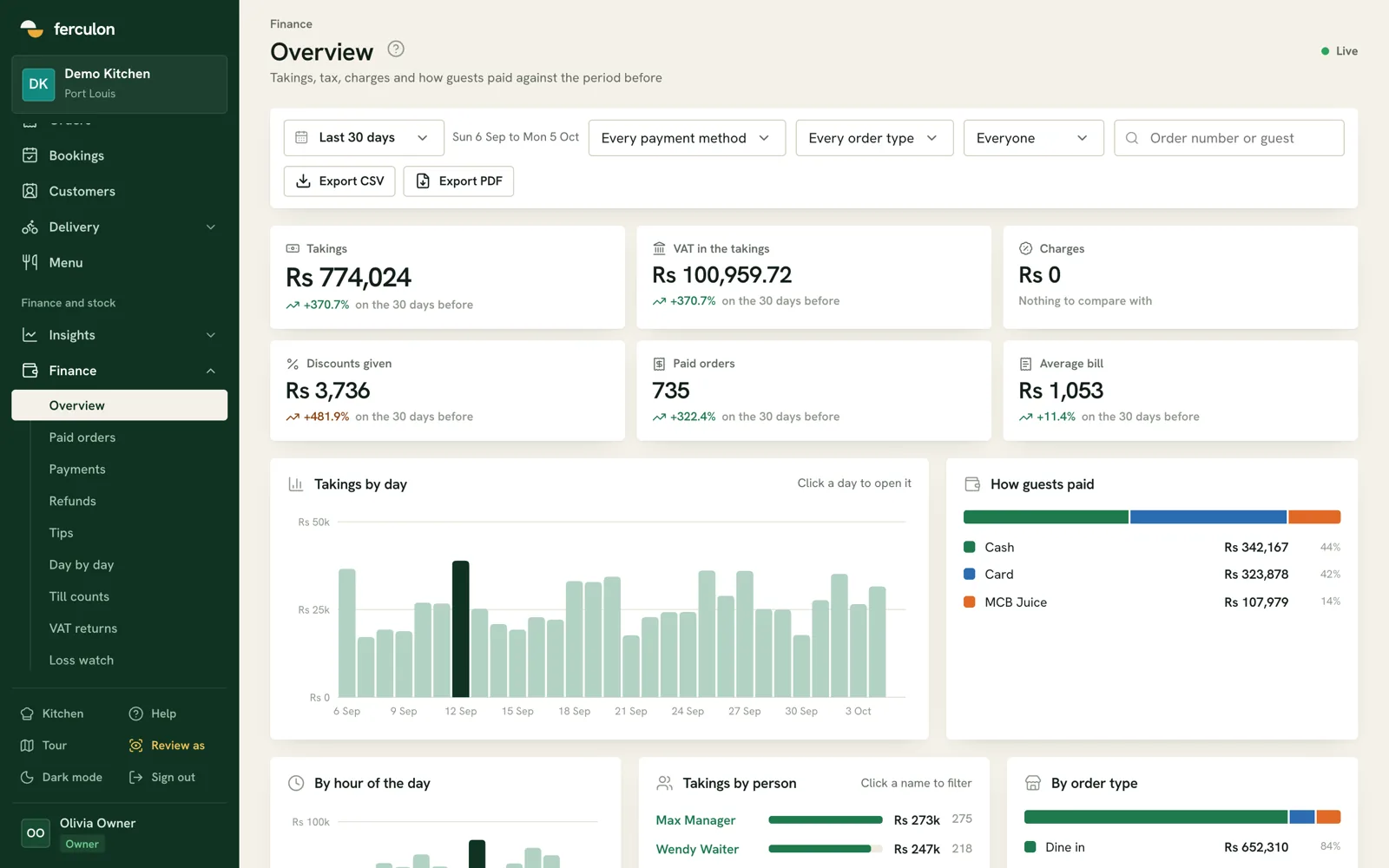
For a concrete example, the Ferculon floor workflow lets a waiter take an order, see a live table and split the bill equally, by seat, by dish or by amount. The back office shows paid orders, payments and till counts. Those screens are a useful demonstration, but they do not replace checking how your own team handles exceptions.
Follow one bill from order to payment
Start your trial with one table and a short menu. Enter a first round, send it to the kitchen, then add a second round. Before paying, ask a waiter to read the bill back against the order. This catches wrong quantities, missing options and dishes entered against the wrong table before money changes hands.
- Open and amend the order. Add a dish and its option, then add another dish later. Check that both rounds appear on the same table bill.
- Check the total. Review discounts and any restaurant charges. Confirm the displayed amount matches the bill you intend to give the guest.
- Collect the payment. Record the method and any reference required by your own payment process. Keep a card approval code or wallet reference where staff can find it again.
- Find the completed order. Search paid history by order number. Check who took payment and whether the record matches the receipt.
The separate POS setup guide walks through opening hours, menu, staff access and a controlled test order. Use that setup first if your floor or payment methods are not configured yet. The billing test here begins when a real order is ready to be paid.
Test split bills with the cases your guests use
A split button is only useful if staff can explain what it will do. Ask one person to pay for a dish, another to pay a chosen amount and a third to settle the balance. Then repeat the test with a tip. Check that the bill reaches zero without charging any portion twice, and that tips remain separate from sales.
| Guest request | Split to test | Final check |
|---|---|---|
| We will share evenly | Equal | Each share and the total |
| I will cover my own meal | By seat or by dish | Dish ownership and shared items |
| I will put a set amount on my card | By amount | Balance after that payment |
| I will pay for everyone | Whole bill | One payment and a closed order |
Also test a mistaken tap before the final payment. Ask how a manager corrects it and what remains in the record. Do not assume that splitting a bill means issuing separate fiscal invoices. The fiscal document requirement is a separate question for your accountant and the MRA.
Reconcile each payment method and the till
At close, totals should be traceable to transactions. Count physical cash, compare it with the expected drawer amount, and investigate any difference. Then compare card and wallet totals with the corresponding provider records. A phone notification or a guest screenshot is not the same as a matched payment record.
- Cash: Record the opening float, cash taken and any paid-out amount. Count the drawer with a second person if that is your policy.
- Card: Keep the approval reference that helps staff match a terminal transaction to the order.
- Wallet: Test MCB Juice or any other method your restaurant accepts, including the reference staff enter and how a failed or pending payment is handled.
- Tips: Keep tips visible apart from takings so the staff and finance views tell the same story.
Ferculon supports configured cash, card, MCB Juice, my.t money, Blink and voucher methods, with method-specific reference rules. Its Finance overview shows paid orders, payments, tips, refunds, daily totals and till counts, with CSV and PDF exports. These are operational records. You still need to compare them with the cash in the drawer and the provider statements.
Keep receipts and MRA fiscalisation separate
A restaurant bill, a payment receipt and a fiscal invoice are not interchangeable labels. The Mauritius Revenue Authority e-Invoicing guidance explains fiscalisation through an Electronic Billing System. The MRA functional specifications describe sending invoice data to its platform and receiving an Invoice Registration Number and QR code. Check your obligations with a qualified adviser using your business details.
The MRA e-invoicing guide for restaurants covers the separate compliance question in more detail. When comparing billing software, ask the supplier to show exactly what document is issued, whether any MRA connection is live, and how they prove it. Do not rely on a broad claim such as “tax ready”.
Run a billing demo that resembles a real service
A quiet sales demonstration can hide the hand-offs that cause trouble. Give every supplier the same test sheet. Include a dine-in table with two rounds, one split, one wallet payment, one cash payment and a closing cash count. Ask the waiter, counter person and manager to perform their own part. Watch where they pause or have to ask another person.
- Prepare your rules. Write down which staff may discount, void, take payment and approve a correction. Decide which methods you will accept.
- Run the order. Add dishes from the floor, then check the kitchen sees the right ticket and the table bill stays current.
- Split and pay. Use two methods on one bill. Capture the references and check the remaining amount after each payment.
- Close and reconcile. Find the paid order, export or review payment history, count the till and explain any difference.
- Repeat after a connection problem. Ask what each device can still do and what staff must record manually. Make the supplier demonstrate, rather than assume offline behaviour.
If ingredients and recipe costs also matter to the buying decision, keep that as a separate trial. The inventory guide covers counts, deliveries and stock movements. Billing quality should be judged by a clean order and payment trail first, then by how those records feed the wider operation.
Ask these questions before choosing a supplier
- Can staff find an order later? Ask to search by order number and inspect its payments, discounts and refunds.
- Can each method be reconciled? Ask where wallet and card references appear in the export, and who can edit them.
- What happens during an outage? Test the specific waiter device, printer and office screen you plan to use.
- What is the document status? Ask separately about the customer receipt, company invoice and MRA fiscal invoice.
- Who helps during service? Ask about training, hardware compatibility and support at the hours your restaurant trades.
Use the supplier answers to compare the workflow, not a badge or an adjective. For Ferculon, see pricing for the current commercial conversation or request a demo with your own billing test sheet.
Questions people ask
What should restaurant billing software do?
It should keep the order, bill, payments and final record connected. Test the full journey from a live table to a paid order and a till count before comparing extra features.
Can a restaurant bill be split by dish or seat?
Some systems support both, but the details differ. Ferculon lets staff split a bill equally, by seat, by dish or by amount. Test shared items, tips and the remaining balance in your own demo.
How should a restaurant check wallet payments?
Record the selected wallet method and its transaction reference, then compare that record with the provider statement. Staff should not treat a guest screenshot alone as proof that settlement is complete.
Does restaurant billing software automatically meet MRA e-invoicing rules?
No. An operational receipt is not automatically a fiscal invoice. Ferculon does not transmit fiscal invoices to the MRA Electronic Billing System. Check the MRA guidance and your obligations with a qualified adviser.
What should I ask to see in a billing demo?
Run a real table order, add a later round, split the bill, take two payment methods and find the paid order. Then count the cash drawer and ask to see the payment references and exported record.