A restaurant CRM is the guest book your whole team shares: who each guest is, how often they come, what they spend, when they booked and what the team should remember about them. It works best when it fills itself from bookings, orders and payments, because a record nobody has to type stays up to date.
These are the fields worth keeping, and where each one should come from.
| Field | Where it comes from | What the team uses it for |
|---|---|---|
| Name and phone number | The booking or the online order | Finding the guest and confirming a booking |
| Visits and last visit | Orders linked to the guest | Spotting regulars and guests who have stopped coming |
| Spending | Payments on those orders | Seeing your top spenders |
| Bookings and no-shows | The bookings book | Deciding whether to confirm a table straight away |
| Notes | Staff, after asking the guest | Allergies, seating preferences and occasions |
| Consent to news | The guest, when asked | Who you may write to about events and menus |
What a restaurant CRM should record
Restaurants already collect most of this. A booking has a name and a phone number, an online order has an address and a paid bill has a total. A CRM joins them to one guest, so the visit count, the spending and the next booking sit on one line.
Use the phone number as the key. Guests change email addresses and spell their names in different ways, but most give the same mobile number each time, and it is the number you call to confirm a table.
Online orders belong in the same record. A guest who orders a pick-up on Tuesday and books a table on Saturday is one guest with two visits, and the record should show both.
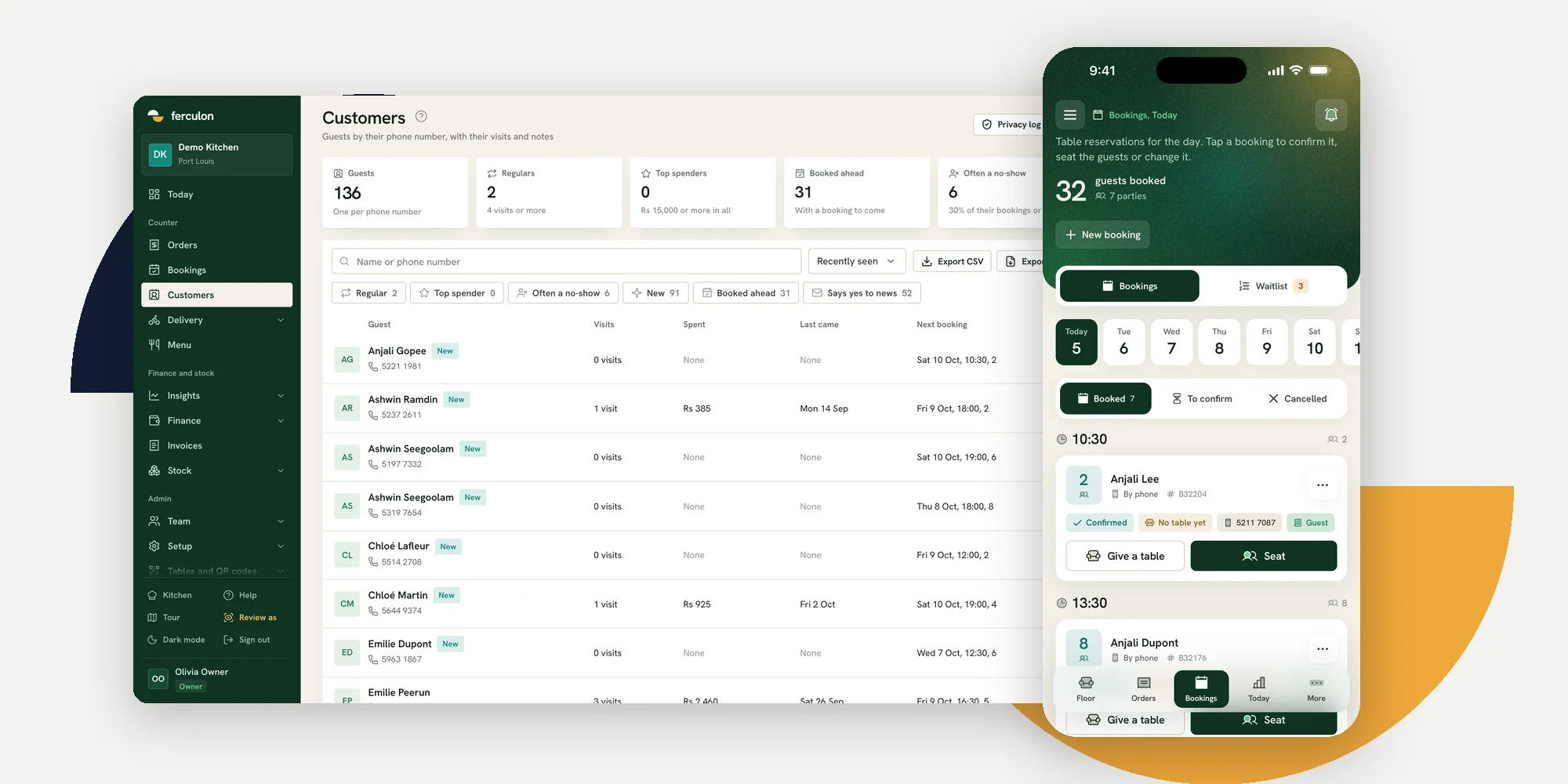
In Ferculon, each guest is saved by phone number with their visits, spending, bookings and notes. The customer list shows regulars, top spenders, guests who have booked ahead and guests who are often a no-show, can be searched by name or number, and exports to CSV or PDF.

Use guest records during service
A guest record is most useful at the door and at the table. When a regular books, the host can see how often they have been; when a guest with an allergy note sits down, the waiter knows before taking the order. Keep notes short and factual, written so the guest would be comfortable reading them.
Bookings are where the record saves the most. A guest who has missed several bookings can be asked to confirm on the day, while a regular can be confirmed straight away. The reservation system guide covers confirming, changing and cancelling bookings.
Bring regulars back without chasing them
- Thank regulars in person. The record tells the team who comes often; the thanks should come from a person.
- Ask for a review once. Ferculon asks each guest once and never chases, and never asks guests who ordered through a delivery app.
- Answer reviews from the back office. Reply to an unhappy guest’s review and say what you have changed.
- Write only to guests who said yes. Keep a record of consent to news and respect it.
- Notice who has stopped coming. Sort by last visit and call a regular you have not seen for a while.
Set up guest records in a week
- Day one: agree that every booking and every online order carries a mobile number.
- Day two: decide what counts as a regular and a frequent no-show for your restaurant, and set the thresholds.
- Day three: agree the notes staff may write, such as allergies, seating and occasions, and the ones they may not.
- Day four: ask guests whether they would like news, and record the answer.
- Day five: give the host the list of today’s bookings with visit counts before service.
- End of the week: sort by last visit, call two regulars you have missed, and check who viewed which records.
Keep guest data private and accurate
A guest record is personal data. Collect only what the team uses, tell guests what you keep and why, and let them ask to be removed. Follow the data protection law where you trade: the GDPR in the European Union, the UK GDPR in the United Kingdom and the Data Protection Act 2017 in Mauritius, for example.
Ferculon keeps a privacy log of who viewed each guest record. When a guest asks to be forgotten, their name is removed while any review they left stays, and guest names are kept short on your public page.
How to choose a restaurant CRM
- Does the record fill itself from bookings, orders and payments, or does staff type it?
- Is each guest one record, keyed on a phone number?
- Can the host see visits and notes when a booking comes in?
- Can you filter regulars, top spenders and frequent no-shows, and export the list?
- Is there a log of who viewed each record, and a way to forget a guest?
A CRM that sits apart from the till needs an import or an integration to stay current. One that shares a system with bookings, online orders and payments fills itself as the restaurant trades.
Questions people ask
What is a restaurant CRM?
A shared record of each guest: who they are, how often they come, what they spend, their bookings and the notes staff keep. The most useful ones fill themselves from bookings, orders and payments.
What should a restaurant CRM track?
Name and phone number, visits and the last visit, spending, bookings and no-shows, short notes such as allergies or seating preferences, and whether the guest agreed to receive news.
Do I need a separate CRM if my POS has guest records?
Usually not, if the POS links bookings, orders and payments to the same guest and lets you filter and export the list. A separate CRM needs an import or an integration to stay current.
Does my restaurant need a CRM?
If you take bookings or online orders, you already collect guest names and numbers, and a CRM joins them into one record per guest so the team can see regulars, no-shows and notes. A restaurant that only serves walk-ins may get less from one.
How do restaurants use a CRM to reduce no-shows?
By keeping each guest’s booking history. A guest who often misses bookings can be asked to confirm on the day, while regulars are confirmed straight away. Ferculon marks guests who are often a no-show on their customer record.
Can a restaurant keep guest data in a CRM?
Yes, within the data protection law where it trades. Collect only what you use, tell guests what you keep and why, keep it secure and remove a guest’s details when they ask.