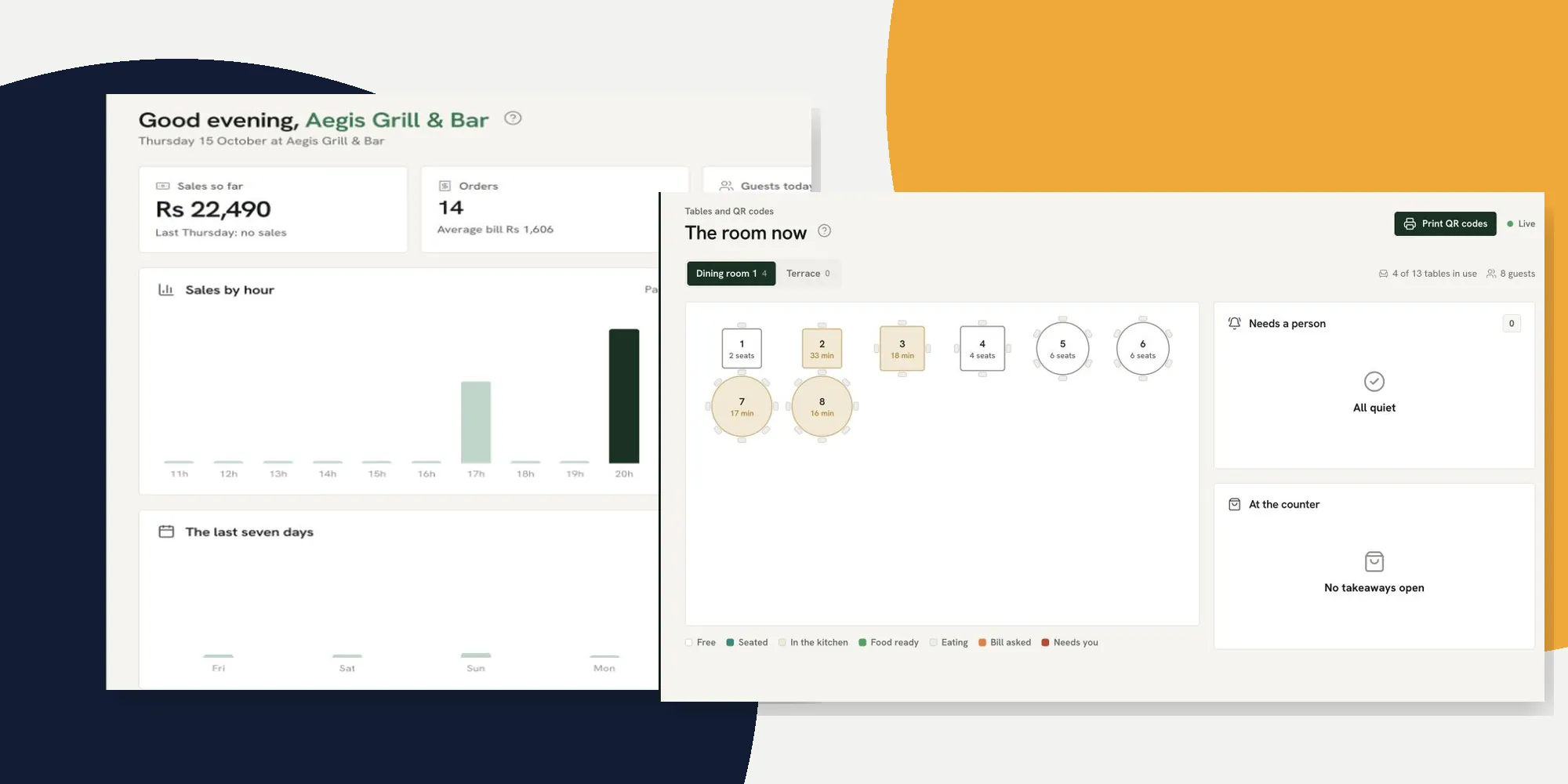
A restaurant order tracking system should answer three questions during a service: where is the order, who needs to act next, and what happened to its bill? In Ferculon’s back office, the Today, live floor and Orders screens answer different parts of that question. This tutorial follows the screens in the Aegis Grill & Bar demo restaurant so an owner in Mauritius can repeat the route with their own team.
The screenshots show a demo restaurant at different moments, so their totals do not all match. Its orders, dishes, amounts and staff activity are examples of the interface, not customer results or a prediction for your restaurant. The setup guide covers first configuration in depth; here the emphasis is what to check before, during and after each service.
| When | Screen | What it tells you |
|---|---|---|
| Before service | Setup and Menu | Whether hours, ordering rules, dishes and stations match the way you work |
| Order arrives | The room now or Orders | Which table or channel it came from and whether someone must accept it |
| Food is made | Kitchen | Which course and station has the ticket, and whether it is ready |
| Bill is settled | Orders | The order reference, status, total, payment and receipt |
| Close of day | Today and Day report | Paid sales, open bills, payment mix and the day record |
What a restaurant order tracking system must show during service
A useful order trail starts when a waiter, guest or counter person creates an order, then follows it to the kitchen, the table or collection point, the payment and the history. It needs a stable order number and a visible status. An owner should also be able to separate an open bill from money already taken. Adding the two together as “sales” gives the wrong answer while tables are still eating.
On the demo Today screen, Sales so far reflects paid orders, while Open right now counts unsettled orders and shows the amount on those bills. Orders shows its own Paid in this range and Open now figures. Those are different views of the same service, so check the date range and the status before comparing totals. The screenshot below is deliberately cropped to the controls; the demo figures are illustrative.

If a supplier calls a list of payments an order tracking system, ask to see the step before payment. Can the floor find a table waiting for a waiter? Can the kitchen see the course and station? Can the counter find a takeaway due for collection? The floor feature and kitchen feature describe those hand-offs in Ferculon.
Prepare the screens before the shift starts
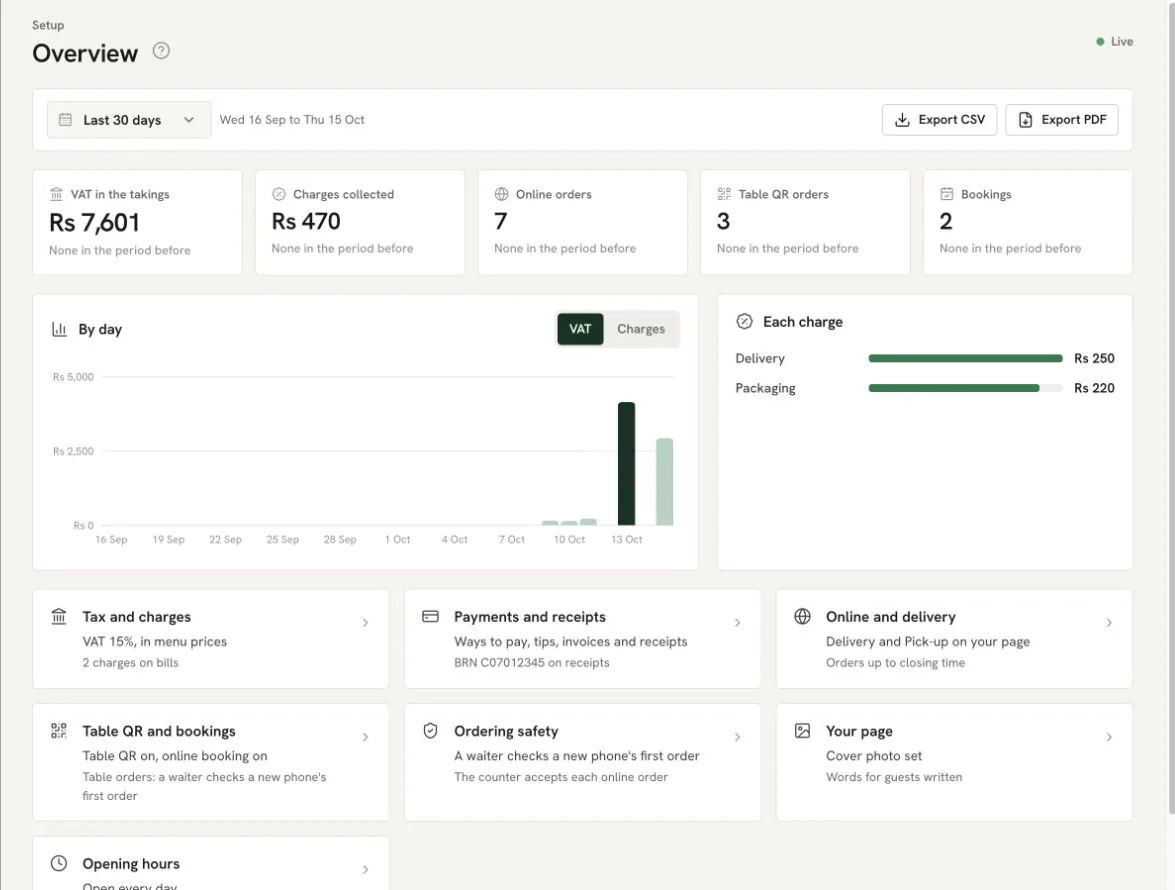
Open Setup in the office and review its Overview. Follow the links for opening hours, ordering safety, online and delivery, table QR and bookings, payments and receipts, and printers and stations. The point is to decide who accepts an online order, whether a new table QR phone needs a waiter check, and where a dish is sent. Those settings affect what your team sees when an order arrives.
Then open Menu. Check the dishes, options, allergens and kitchen course or station for each channel you actually use. An item can look right on the office screen yet still reach the wrong station. Finally check Tables and QR codes for the room layout and table names, and make sure the right waiter is assigned to each service area. The restaurant POS setup guide gives the full first-time sequence for these screens.
Use a controlled test order before opening to guests. Put one dish through the waiter or counter view, find it on the kitchen screen, mark it ready, then find the same order number in Orders. Do not create a sale simply to make a dashboard look busy. Use your own procedure for test bills and records, and have the person working the station confirm what they saw.
Follow an order from the room to the kitchen
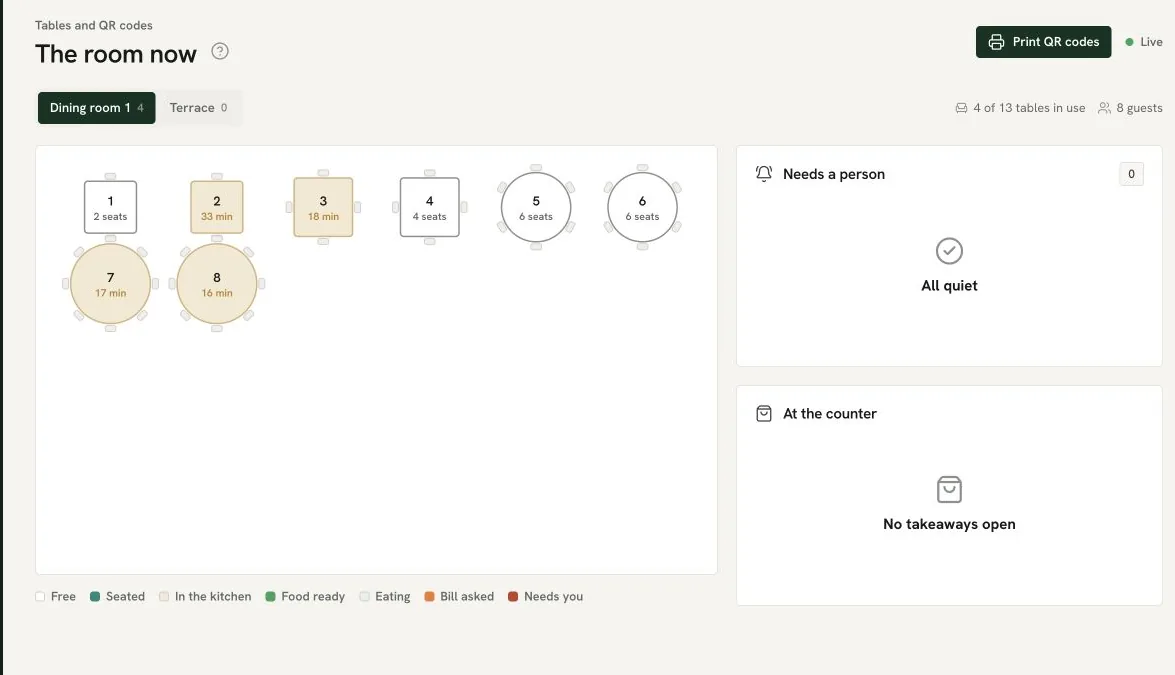
During service, open Today and choose Live floor, or open Tables and QR codes and then The room now. The plan shows table states such as seated, in the kitchen, food ready, eating and bill asked. It also shows which tables need a person. Use that state to decide which colleague should act, then open the specific table or order to confirm the detail.
A waiter sends dishes from the table app. Guest table QR orders join the same table bill; your restaurant’s setting determines whether a new phone’s first order waits for a waiter check. Counter and online orders enter through their own channels. Once an order reaches the kitchen, tickets are organised by station and course. The kitchen marks a course ready, and the assigned waiter or counter receives the appropriate ready message. Do not assume that “sent” means “served”; the hand-off still needs a person.
For the kitchen team, check the table or order reference, the dish, any option or allergen, and the station. If the kitchen cannot find the ticket, look first at whether the order was actually sent and whether the dish has the expected station. If a table asks for the bill before food is out, follow the live status rather than guessing from the age of the ticket. The kitchen display test explains the ready-message route and an outage drill.
Find open and paid orders in the office
Open Orders. Choose Open now to focus on bills still open. Choose By date for a period of order history; it includes open orders and those closed in the selected range. Use Order type to narrow the channel, Show to find voids or discounts, or the search box for an order number or guest. A manager who knows the order reference can answer a query without paging through the whole day.
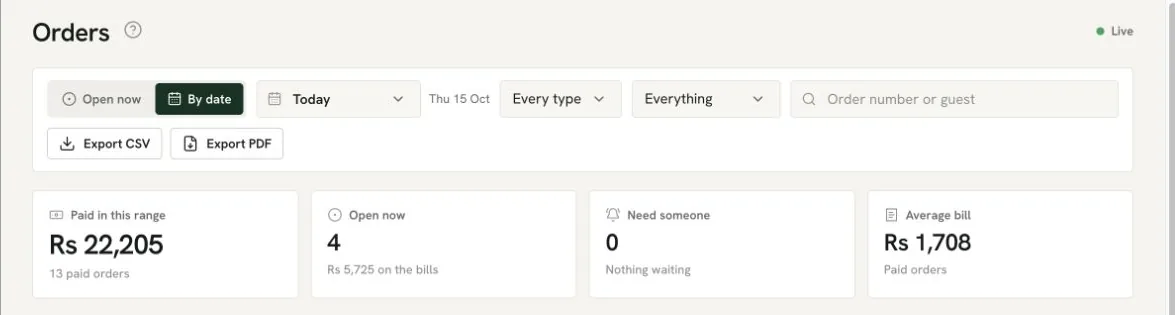
Read the summary before the rows. Paid in this range is the sum of paid orders for the filter and period; Open now shows bills that have not closed. Need someone counts an open order or table call requiring action. Average bill uses paid orders. The order list then shows the reference, where the order came from, who took it, item count, phase, payment method and total. Open a row for the bill, payments, receipt and changes instead of trying to infer the reason for a total from the list alone.
If a dish was voided or a discount was applied, use the matching Show filter and inspect the order record. Check who made the change and why; the back office also provides finance and audit views. Export CSV or PDF when your role allows it and your accountant or manager needs the records. The CSV order export is limited by the interface to a selected range of up to 31 days, so choose a shorter range if it declines the file.
Read Today and reconcile the day
Return to Today when the service is moving. Sales by hour counts paid orders in Mauritius time. The room panel shows tables in use, seated guests, calls, plates at the pass, bill requests and free tables. Best sellers and the short day brief help you decide where to look next, but they are prompts to inspect the underlying order or stock, not proof that a shift went well.
At closing, use the Day report if your role can open it, then compare the payment mix with the till and your own settlement records. A wallet entry, card transaction and cash in the drawer have different reconciliation trails. An open bill should not be counted as paid simply because the table has finished eating. If the figures disagree, use Orders to find the references and the audit trail for any refund, void or discount before adjusting your books.
The demo Overview in Setup also shows channel counts and links back to the rules behind them. It can help you spot a channel that was left on unexpectedly. For longer periods, use the back office finance and insights views, and check your own accounting treatment with an adviser. This operational tutorial is not tax or legal advice.
When an order status looks wrong, check the hand-off
- The table is waiting but the kitchen has no ticket. Open the order reference and confirm that dishes were sent, then check the course and station assigned to the dish. Ask the kitchen to check the relevant station view before re-entering an order.
- The kitchen says ready but the floor still waits. Confirm that the correct course and table were marked ready. Check the assigned waiter or counter and whether the team actually carried the dishes out.
- The day total does not match the open bills. Separate paid sales from unsettled bills. Set the same date range and order-type filter before comparing Orders with Today.
- A payment or change looks unfamiliar. Find the order by number, open its payment and change history, then consult the audit view. Do not alter a completed bill just to make a summary figure match.
Where Ferculon fits and what it cannot do for you
Ferculon joins the waiter, kitchen, counter and office views so one order reference can be followed from opening to payment. That is the practical test to bring to any supplier if you are looking for the best restaurant management system or best restaurant POS in Mauritius. The Mauritius POS page covers the broader buying question; this guide shows one daily workflow. Ask for a demonstration using your own room and menu, and check pricing for a quote for your restaurant.
The limits matter. Software cannot know whether a plate reached the right guest unless the team records the hand-off. It cannot decide your tax treatment or replace a till count. Ferculon does not transmit fiscal invoices to the MRA Electronic Billing System. If your restaurant needs that transmission, raise it during the demonstration and seek qualified advice before choosing a system. To see the order trail against your own service, arrange a Ferculon demonstration.
Questions people ask
How do restaurants keep track of orders during service?
Give each order a reference and follow it through the floor or counter, kitchen, ready state and payment. In Ferculon, Today and the live floor show the service state, while Orders shows the individual bill and its history. Staff still have to record and confirm the physical hand-offs.
How do I find a specific Ferculon order?
Open Orders and search by order number or guest. Use Open now for active bills or By date for a chosen period, then narrow by order type if needed. Open the row to inspect the bill, payments, receipt and changes.
Why is an open bill not included in Sales so far?
Sales so far is based on paid orders. Open now shows bills that are still unsettled, with the amount on them. Compare the two separately so a busy room is not mistaken for money already taken.
Can I see a kitchen order from the office?
Yes. The live floor and Orders show the table or order phase, while the kitchen screen shows tickets by course and station. Find the same order reference across the views and ask the team to confirm a ready dish was actually served.
Does Ferculon send fiscal invoices to the MRA?
No. Ferculon does not transmit fiscal invoices to the MRA Electronic Billing System. This guide explains operational order tracking and is not tax or legal advice; ask a qualified adviser about your restaurant’s obligations.